• Descriptive
    • Moments
    • Concentration
    • Central Tendency
    • Variability
    • Stem-and-Leaf Plot
    • Histogram & Frequency Table
    • Data Quality Forensics
    • Conditional EDA
    • Quantiles
    • Kernel Density Estimation
    • Normal QQ Plot
    • Bootstrap Plot

    • Multivariate Descriptive Statistics
  • Distributions
    • Binomial Probabilities
    • Geometric Probabilities
    • Negative Binomial Probabilities
    • Hypergeometric Probabilities
    • Multinomial Probabilities
    • Dirichlet
    • Poisson Probabilities

    • Exponential
    • Gamma
    • Erlang
    • Weibull
    • Rayleigh
    • Maxwell-Boltzmann
    • Lognormal
    • Pareto
    • Inverse Gamma
    • Inverse Chi-Square

    • Beta
    • Power
    • Beta Prime (Inv. Beta)
    • Triangular

    • Normal (area)
    • Logistic
    • Laplace
    • Cauchy (standard)
    • Cauchy (location-scale)
    • Gumbel
    • Fréchet
    • Generalized Extreme Value

    • Normal RNG
    • ML Fitting
    • Tukey Lambda PPCC
    • Box-Cox Normality Plot
    • Noncentral t
    • Noncentral F
    • Sample Correlation r

    • Empirical Tests
  • Hypotheses
    • Theoretical Aspects of Hypothesis Testing
    • Bayesian Inference
    • Minimum Sample Size

    • Empirical Tests
    • Multivariate (pair-wise) Testing
  • Models
    • Manual Model Building
    • Guided Model Building
  • Time Series
    • Time Series Plot
    • Decomposition
    • Exponential Smoothing

    • Blocked Bootstrap Plot
    • Mean Plot
    • (P)ACF
    • VRM
    • Standard Deviation-Mean Plot
    • Spectral Analysis
    • ARIMA

    • Cross Correlation Function
    • Granger Causality
  1. Descriptive Statistics & Exploratory Data Analysis
  2. 79  Box-Cox Normality Plot
  • Preface
  • Getting Started
    • 1  Introduction
    • 2  Why Do We Need Innovative Technology?
    • 3  Basic Definitions
    • 4  The Big Picture: Why We Analyze Data
  • Introduction to Probability
    • 5  Definitions of Probability
    • 6  Jeffreys’ axiom system
    • 7  Bayes’ Theorem
    • 8  Sensitivity and Specificity
    • 9  Naive Bayes Classifier
    • 10  Law of Large Numbers

    • 11  Problems
  • Probability Distributions
    • 12  Bernoulli Distribution
    • 13  Binomial Distribution
    • 14  Geometric Distribution
    • 15  Negative Binomial Distribution
    • 16  Hypergeometric Distribution
    • 17  Multinomial Distribution
    • 18  Poisson Distribution

    • 19  Uniform Distribution (Rectangular Distribution)
    • 20  Normal Distribution (Gaussian Distribution)
    • 21  Gaussian Naive Bayes Classifier
    • 22  Chi Distribution
    • 23  Chi-squared Distribution (1 parameter)
    • 24  Chi-squared Distribution (2 parameters)
    • 25  Student t-Distribution
    • 26  Fisher F-Distribution
    • 27  Exponential Distribution
    • 28  Lognormal Distribution
    • 29  Gamma Distribution
    • 30  Beta Distribution
    • 31  Weibull Distribution
    • 32  Pareto Distribution
    • 33  Inverse Gamma Distribution
    • 34  Rayleigh Distribution
    • 35  Erlang Distribution
    • 36  Logistic Distribution
    • 37  Laplace Distribution
    • 38  Gumbel Distribution
    • 39  Cauchy Distribution
    • 40  Triangular Distribution
    • 41  Power Distribution
    • 42  Beta Prime Distribution
    • 43  Sample Correlation Distribution
    • 44  Dirichlet Distribution
    • 45  Generalized Extreme Value (GEV) Distribution
    • 46  Frechet Distribution
    • 47  Noncentral t Distribution
    • 48  Noncentral F Distribution
    • 49  Inverse Chi-Squared Distribution
    • 50  Maxwell-Boltzmann Distribution
    • 51  Distribution Relationship Map

    • 52  Problems
  • Descriptive Statistics & Exploratory Data Analysis
    • 53  Types of Data
    • 54  Datasheets

    • 55  Frequency Plot (Bar Plot)
    • 56  Frequency Table
    • 57  Contingency Table
    • 58  Binomial Classification Metrics
    • 59  Confusion Matrix
    • 60  ROC Analysis

    • 61  Stem-and-Leaf Plot
    • 62  Histogram
    • 63  Data Quality Forensics
    • 64  Quantiles
    • 65  Central Tendency
    • 66  Variability
    • 67  Skewness & Kurtosis
    • 68  Concentration
    • 69  Notched Boxplot
    • 70  Scatterplot
    • 71  Pearson Correlation
    • 72  Rank Correlation
    • 73  Partial Pearson Correlation
    • 74  Simple Linear Regression
    • 75  Moments
    • 76  Quantile-Quantile Plot (QQ Plot)
    • 77  Normal Probability Plot
    • 78  Probability Plot Correlation Coefficient Plot (PPCC Plot)
    • 79  Box-Cox Normality Plot
    • 80  Kernel Density Estimation
    • 81  Bivariate Kernel Density Plot
    • 82  Conditional EDA: Panel Diagnostics
    • 83  Bootstrap Plot (Central Tendency)
    • 84  Survey Scores Rank Order Comparison
    • 85  Cronbach Alpha

    • 86  Equi-distant Time Series
    • 87  Time Series Plot (Run Sequence Plot)
    • 88  Mean Plot
    • 89  Blocked Bootstrap Plot (Central Tendency)
    • 90  Standard Deviation-Mean Plot
    • 91  Variance Reduction Matrix
    • 92  (Partial) Autocorrelation Function
    • 93  Periodogram & Cumulative Periodogram

    • 94  Problems
  • Hypothesis Testing
    • 95  Normal Distributions revisited
    • 96  The Population
    • 97  The Sample
    • 98  The One-Sided Hypothesis Test
    • 99  The Two-Sided Hypothesis Test
    • 100  When to use a one-sided or two-sided test?
    • 101  What if \(\sigma\) is unknown?
    • 102  The Central Limit Theorem (revisited)
    • 103  Statistical Test of the Population Mean with known Variance
    • 104  Statistical Test of the Population Mean with unknown Variance
    • 105  Statistical Test of the Variance
    • 106  Statistical Test of the Population Proportion
    • 107  Statistical Test of the Standard Deviation \(\sigma\)
    • 108  Statistical Test of the difference between Means -- Independent/Unpaired Samples
    • 109  Statistical Test of the difference between Means -- Dependent/Paired Samples
    • 110  Statistical Test of the difference between Variances -- Independent/Unpaired Samples

    • 111  Hypothesis Testing for Research Purposes
    • 112  Decision Thresholds, Alpha, and Confidence Levels
    • 113  Bayesian Inference for Decision-Making
    • 114  One Sample t-Test
    • 115  Skewness & Kurtosis Tests
    • 116  Paired Two Sample t-Test
    • 117  Wilcoxon Signed-Rank Test
    • 118  Unpaired Two Sample t-Test
    • 119  Unpaired Two Sample Welch Test
    • 120  Two One-Sided Tests (TOST) for Equivalence
    • 121  Mann-Whitney U test (Wilcoxon Rank-Sum Test)
    • 122  Bayesian Two Sample Test
    • 123  Median Test based on Notched Boxplots
    • 124  Chi-Squared Tests for Count Data
    • 125  Kolmogorov-Smirnov Test
    • 126  One Way Analysis of Variance (1-way ANOVA)
    • 127  Kruskal-Wallis Test
    • 128  Two Way Analysis of Variance (2-way ANOVA)
    • 129  Repeated Measures ANOVA
    • 130  Friedman Test
    • 131  Testing Correlations
    • 132  A Note on Causality

    • 133  Problems
  • Regression Models
    • 134  Simple Linear Regression Model (SLRM)
    • 135  Multiple Linear Regression Model (MLRM)
    • 136  Logistic Regression
    • 137  Generalized Linear Models
    • 138  Multinomial and Ordinal Logistic Regression
    • 139  Cox Proportional Hazards Regression
    • 140  Conditional Inference Trees
    • 141  Leaf Diagnostics for Conditional Inference Trees
    • 142  Conditional Random Forests
    • 143  Hypothesis Testing with Linear Regression Models (from a Practical Point of View)

    • 144  Problems
  • Introduction to Time Series Analysis
    • 145  Case: the Market of Health and Personal Care Products
    • 146  Decomposition of Time Series
    • 147  Ad hoc Forecasting of Time Series
  • Box-Jenkins Analysis
    • 148  Introduction to Box-Jenkins Analysis
    • 149  Theoretical Concepts
    • 150  Stationarity
    • 151  Identifying ARMA parameters
    • 152  Estimating ARMA Parameters and Residual Diagnostics
    • 153  Forecasting with ARIMA models
    • 154  Intervention Analysis
    • 155  Cross-Correlation Function
    • 156  Transfer Function Noise Models
    • 157  General-to-Specific Modeling
  • Model Building Strategies
    • 158  Introduction to Model Building Strategies
    • 159  Manual Model Building
    • 160  Model Validation
    • 161  Regularization Methods
    • 162  Hyperparameter Optimization Strategies
    • 163  Guided Model Building in Practice
    • 164  Diagnostics, Revision, and Guided Forecasting
    • 165  Leakage, Target Encoding, and Robust Regression
  • References
  • Appendices
    • Appendices
    • A  Method Selection Guide
    • B  Presentations and Teaching Materials
    • C  R Language Concepts for Statistical Computing
    • D  Matrix Algebra
    • E  Standard Normal Table (Gaussian Table)
    • F  Critical values of Student’s \(t\) distribution with \(\nu\) degrees of freedom
    • G  Upper-tail critical values of the \(\chi^2\)-distribution with \(\nu\) degrees of freedom
    • H  Lower-tail critical values of the \(\chi^2\)-distribution with \(\nu\) degrees of freedom

Table of contents

  • 79.1 Definition
    • 79.1.1 Full (Sign-Preserving) Power Transformation
    • 79.1.2 Simple Box-Cox Transformation
  • 79.2 Horizontal axis
  • 79.3 Vertical axis
  • 79.4 R Module
    • 79.4.1 Public website
    • 79.4.2 RFC
  • 79.5 Purpose
  • 79.6 Pros & Cons
    • 79.6.1 Pros
    • 79.6.2 Cons
  • 79.7 Example
  • 79.8 Task
  1. Descriptive Statistics & Exploratory Data Analysis
  2. 79  Box-Cox Normality Plot

79  Box-Cox Normality Plot

79.1 Definition

The Box-Cox Normality Plot is closely related to the PPCC Plot. It uses the same iterative procedure but with a different objective: instead of identifying which distribution best fits the data, the Box-Cox Normality Plot finds the optimal power transformation parameter \(\lambda\) (based on the Box-Cox transformation (Box and Cox 1964)) that makes the data as close to normally distributed as possible.

The procedure works as follows:

  1. a value for the transformation parameter \(\lambda\) is set to an initial value
  2. all observations are transformed using the Box-Cox transformation for the current value of \(\lambda\)
  3. the Normal Probability Plot (i.e. QQ Plot against the Normal Distribution) is computed for the transformed data
  4. the Pearson Correlation Coefficient (of the Normal Probability Plot) is computed and stored together with the current value of \(\lambda\)
  5. steps 2 through 4 are repeated until a (pre-specified) final value is reached for the transformation parameter
  6. a plot is generated which shows all Pearson Correlation Coefficients against their respective \(\lambda\) values

The \(\lambda\) value that produces the highest correlation indicates the power transformation that brings the data closest to normality.

79.1.1 Full (Sign-Preserving) Power Transformation

The following sign-preserving, Box-Cox-like transformation is defined as

\[ T(Y) = \begin{cases}\text{sign}(Y)\frac{|Y|^\lambda-1}{\lambda} & \text{for } \lambda \neq 0 \\\text{sign}(Y)\ln|Y| & \text{for } \lambda = 0\end{cases} \]

which is the default setting for the Box-Cox Normality Plot in this module. It is not the standard Box-Cox transformation: standard Box-Cox requires strictly positive data (or an additive shift), while the use of \(\text{sign}(Y)\) and \(|Y|\) allows this variant to handle negative values (except \(Y=0\) when \(\lambda=0\)).

79.1.2 Simple Box-Cox Transformation

The simple Box-Cox transformation is defined as

\[ T(Y) = \begin{cases} Y^\lambda & \text{for } \lambda \neq 0 \\ \ln Y & \text{for } \lambda = 0\end{cases} \]

The simple transformation is more commonly encountered in the literature but requires strictly positive data.

Common values of \(\lambda\) correspond to well-known transformations – Table 79.1 shows the most frequently used values.

Table 79.1: Common Box-Cox lambda values and their corresponding transformations
\(\lambda\) Transformation
\(\lambda = -1\) reciprocal: \(T(Y) = 1/Y\)
\(\lambda = -0.5\) reciprocal square root: \(T(Y) = 1/\sqrt{Y}\)
\(\lambda = 0\) natural logarithm: \(T(Y) = \ln Y\)
\(\lambda = 0.5\) square root: \(T(Y) = \sqrt{Y}\)
\(\lambda = 1\) no transformation: \(T(Y) = Y\) (identity)
\(\lambda = 2\) square: \(T(Y) = Y^2\)

79.2 Horizontal axis

The horizontal axis displays the values of \(\lambda\) which varied between two pre-specified (minimum and maximum) values.

79.3 Vertical axis

The vertical axis displays the Pearson Correlation Coefficients between the Normal Quantiles and the sorted transformed data.

79.4 R Module

79.4.1 Public website

The Box-Cox Normality Plot can be found on the public website:

  • https://compute.wessa.net/rwasp_boxcoxnorm.wasp

79.4.2 RFC

The Box-Cox Normality Plot is available in RFC under the “Distributions / Box-Cox Normality Plot” menu item.

To compute the Box-Cox Normality Plot on your local machine, the following script can be used in the R console:

library(car)
x <- rlnorm(500) #right-skewed log-normal data, should result in lambda near 0
par1 = 'Full Box-Cox transform' #Type of transformation
par2 <- 200 #abs(minlambda * 100)
par3 <- 200 #maxlambda * 100
numlam <- par2 + par3 + 1
n <- length(x)
c <- array(NA, dim=c(numlam))
l <- array(NA, dim=c(numlam))
mx <- -1
mxli <- -999
for (i in 1:numlam) {
  l[i] <- (i - par2 - 1) / 100
  if (l[i] != 0) {
    if (par1 == 'Full Box-Cox transform') x1 <- sign(x) * (abs(x)^l[i] - 1) / l[i]
    if (par1 == 'Simple Box-Cox transform') x1 <- x^l[i]
  } else {
    if (par1 == 'Full Box-Cox transform') x1 <- sign(x) * log(abs(x))
    if (par1 == 'Simple Box-Cox transform') x1 <- log(x)
  }
  c[i] <- cor(qnorm(ppoints(x), mean=0, sd=1), sort(x1))
  if (mx < c[i]) {
    mx <- c[i]
    mxli <- l[i]
    x1.best <- x1
  }
}
if (mxli != 0) {
  if (par1 == 'Full Box-Cox transform') x1 <- sign(x) * (abs(x)^mxli - 1) / mxli
  if (par1 == 'Simple Box-Cox transform') x1 <- x^mxli
} else {
  if (par1 == 'Full Box-Cox transform') x1 <- sign(x) * log(abs(x))
  if (par1 == 'Simple Box-Cox transform') x1 <- log(x)
}
cat('Maximum correlation:', mx, '\n')
cat('Optimal lambda:', mxli, '\n')
mypT <- powerTransform(x)
summary(mypT)
op <- par(mfrow=c(2,2))
plot(l, c, main='Box-Cox Normality Plot', xlab='Lambda', ylab='Correlation')
mtext(paste('Optimal Lambda =', mxli))
grid()
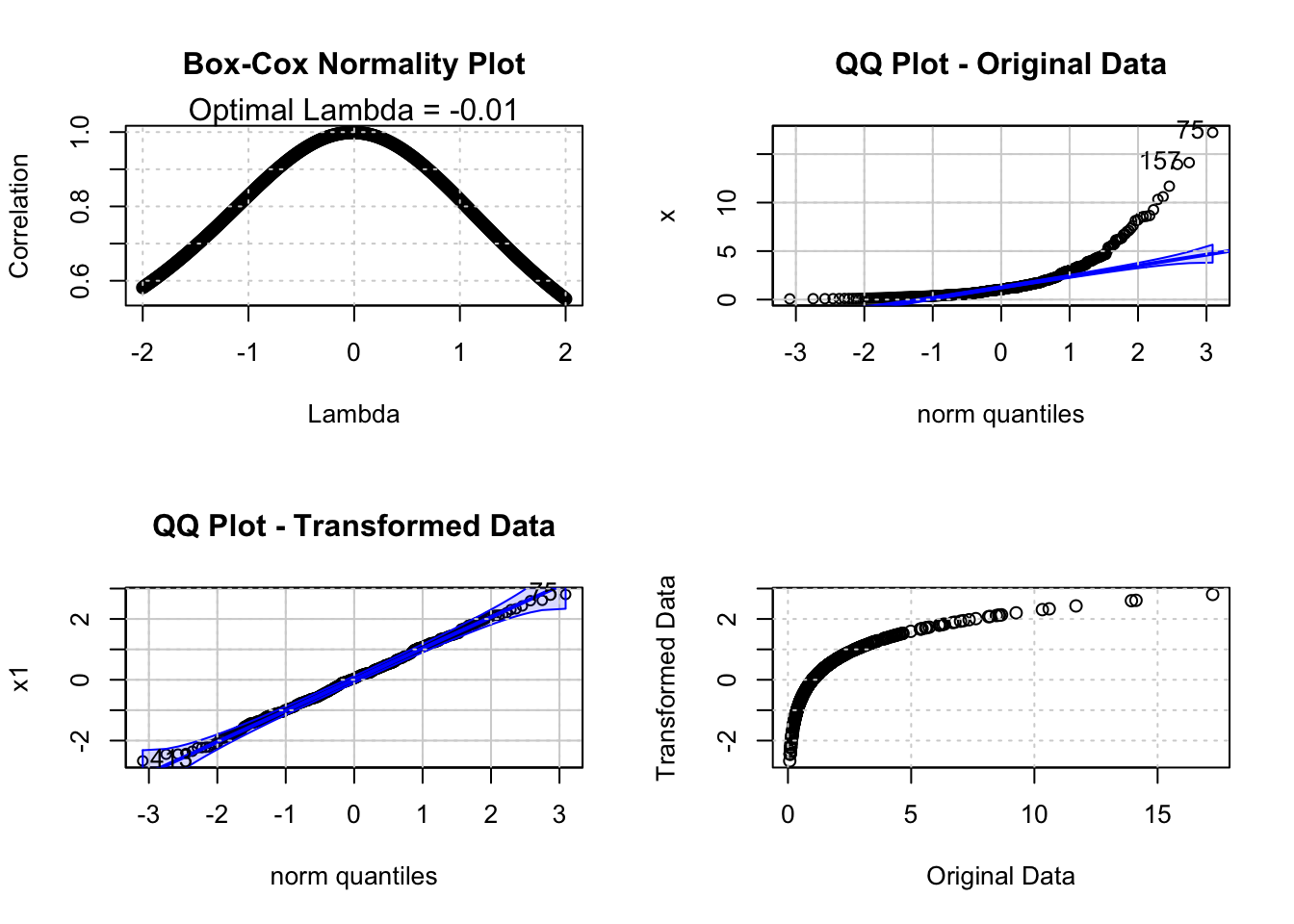
qqPlot(x, main='QQ Plot - Original Data')
grid()
qqPlot(x1, main='QQ Plot - Transformed Data')
grid()
plot(x, x1, xlab='Original Data', ylab='Transformed Data')
grid()

par(op)
Maximum correlation: 0.9990619 
Optimal lambda: -0.01 
bcPower Transformation to Normality 
  Est Power Rounded Pwr Wald Lwr Bnd Wald Upr Bnd
x   -0.0146           0      -0.0892       0.0601

Likelihood ratio test that transformation parameter is equal to 0
 (log transformation)
                            LRT df    pval
LR test, lambda = (0) 0.1462913  1 0.70211

Likelihood ratio test that no transformation is needed
                          LRT df       pval
LR test, lambda = (1) 677.965  1 < 2.22e-16
[1]  75 157
[1]  75 413

To compute the Box-Cox Normality Plot, the R code iterates over values of \(\lambda\) between \(-2\) and \(2\) with a step size of \(0.01\). For each value of \(\lambda\), the data is transformed and the Pearson Correlation Coefficient between the Normal Quantiles (computed via qnorm(ppoints(x))) and the sorted transformed data is computed. The value of \(\lambda\) that produces the highest correlation is the optimal transformation parameter.

In addition to the graphical (correlation-based) approach, the powerTransform function from the car package computes a Maximum Likelihood Estimate (MLE) of \(\lambda\) for a parametric power-transformation model. In this example the data are positive, so the standard Box-Cox MLE is applicable; in general, standard Box-Cox requires strictly positive data (or a prior shift). The MLE approach provides a confidence interval and a formal hypothesis test for whether \(\lambda\) is significantly different from common values such as \(0\) (log transform) or \(1\) (no transform).

79.5 Purpose

The Box-Cox Normality Plot serves two main purposes:

  1. It provides a visual and quantitative method to determine which power transformation brings the data closest to a Normal Distribution. This is particularly useful when normality is an assumption of subsequent analysis (e.g. hypothesis testing, linear regression).
  2. It provides an estimate for \(\lambda\) which can be used to transform the data before further analysis. Note that the value of \(\lambda\) is typically rounded to a convenient value (see Table 79.1) if the rounded value falls within the confidence interval of the MLE estimate.

Note: the Box-Cox Normality Plot is also used in time series analysis to induce stationarity of the variance – see Chapter 150 for a detailed discussion.

79.6 Pros & Cons

79.6.1 Pros

The Box-Cox Normality Plot has the following advantages:

  • it provides a clear visual indication of the optimal transformation parameter
  • it is easy to interpret: a sharp peak in the plot indicates a well-defined optimal \(\lambda\)
  • it combines well with the QQ Plot to show the improvement in normality before and after transformation
  • the MLE approach provides a formal hypothesis test and confidence interval for \(\lambda\)

79.6.2 Cons

The Box-Cox Normality Plot has the following disadvantages:

  • the Box-Cox transformation mainly addresses skewness; it may reduce tail weight caused by right-skewness, but it typically cannot fix multimodality or intrinsically heavy-tailed symmetric distributions
  • the simple transformation requires strictly positive data; a constant may need to be added before the analysis is performed
  • there is no guarantee that any power transformation will achieve normality for a given dataset

79.7 Example

The following analysis shows the Box-Cox Normality Plot for the monthly marriages time series in Belgium. From the Tukey-Lambda PPCC Plot we already know that the distribution of this time series resembles a Uniform Distribution (see Section 78.8). The Box-Cox Normality Plot shows the optimal value of \(\lambda\) to transform the data towards normality.

Interactive Shiny app (click to load).
Open in new tab

The Box-Cox Normality Plot shows that the optimal \(\lambda\) is close to \(0\) (\(\ln Y\)) for the marriages time series. The QQ Plots confirm that the log-transformed data is closer to the Normal Distribution than the original data. The MLE output from powerTransform provides the exact estimate of \(\lambda\) and its confidence interval, which allows us to determine whether rounding to a convenient value (e.g. \(0\)) is appropriate.

79.8 Task

Compute the Box-Cox Normality Plot for the monthly divorces time series and interpret the results. Compare the optimal \(\lambda\) with the result of the PPCC Plot in Section 78.8. What does this tell you about the relationship between the two methods?

Box, George E. P., and David R. Cox. 1964. “An Analysis of Transformations.” Journal of the Royal Statistical Society. Series B (Methodological) 26 (2): 211–52. https://doi.org/10.1111/j.2517-6161.1964.tb00553.x.
78  Probability Plot Correlation Coefficient Plot (PPCC Plot)
80  Kernel Density Estimation

© 2026 Patrick Wessa. Provided as-is, without warranty.

Feedback: e-mail | Anonymous contributions: click to copy (Sats) | click to copy (XMR)

Cookie Preferences