• Descriptive
    • Moments
    • Concentration
    • Central Tendency
    • Variability
    • Stem-and-Leaf Plot
    • Histogram & Frequency Table
    • Data Quality Forensics
    • Conditional EDA
    • Quantiles
    • Kernel Density Estimation
    • Normal QQ Plot
    • Bootstrap Plot

    • Multivariate Descriptive Statistics
  • Distributions
    • Binomial Probabilities
    • Geometric Probabilities
    • Negative Binomial Probabilities
    • Hypergeometric Probabilities
    • Multinomial Probabilities
    • Dirichlet
    • Poisson Probabilities

    • Exponential
    • Gamma
    • Erlang
    • Weibull
    • Rayleigh
    • Maxwell-Boltzmann
    • Lognormal
    • Pareto
    • Inverse Gamma
    • Inverse Chi-Square

    • Beta
    • Power
    • Beta Prime (Inv. Beta)
    • Triangular

    • Normal (area)
    • Logistic
    • Laplace
    • Cauchy (standard)
    • Cauchy (location-scale)
    • Gumbel
    • Fréchet
    • Generalized Extreme Value

    • Normal RNG
    • ML Fitting
    • Tukey Lambda PPCC
    • Box-Cox Normality Plot
    • Noncentral t
    • Noncentral F
    • Sample Correlation r

    • Empirical Tests
  • Hypotheses
    • Theoretical Aspects of Hypothesis Testing
    • Bayesian Inference
    • Minimum Sample Size

    • Empirical Tests
    • Multivariate (pair-wise) Testing
  • Models
    • Manual Model Building
    • Guided Model Building
  • Time Series
    • Time Series Plot
    • Decomposition
    • Exponential Smoothing

    • Blocked Bootstrap Plot
    • Mean Plot
    • (P)ACF
    • VRM
    • Standard Deviation-Mean Plot
    • Spectral Analysis
    • ARIMA

    • Cross Correlation Function
    • Granger Causality
  1. Regression Models
  2. 142  Conditional Random Forests
  • Preface
  • Getting Started
    • 1  Introduction
    • 2  Why Do We Need Innovative Technology?
    • 3  Basic Definitions
    • 4  The Big Picture: Why We Analyze Data
  • Introduction to Probability
    • 5  Definitions of Probability
    • 6  Jeffreys’ axiom system
    • 7  Bayes’ Theorem
    • 8  Sensitivity and Specificity
    • 9  Naive Bayes Classifier
    • 10  Law of Large Numbers

    • 11  Problems
  • Probability Distributions
    • 12  Bernoulli Distribution
    • 13  Binomial Distribution
    • 14  Geometric Distribution
    • 15  Negative Binomial Distribution
    • 16  Hypergeometric Distribution
    • 17  Multinomial Distribution
    • 18  Poisson Distribution

    • 19  Uniform Distribution (Rectangular Distribution)
    • 20  Normal Distribution (Gaussian Distribution)
    • 21  Gaussian Naive Bayes Classifier
    • 22  Chi Distribution
    • 23  Chi-squared Distribution (1 parameter)
    • 24  Chi-squared Distribution (2 parameters)
    • 25  Student t-Distribution
    • 26  Fisher F-Distribution
    • 27  Exponential Distribution
    • 28  Lognormal Distribution
    • 29  Gamma Distribution
    • 30  Beta Distribution
    • 31  Weibull Distribution
    • 32  Pareto Distribution
    • 33  Inverse Gamma Distribution
    • 34  Rayleigh Distribution
    • 35  Erlang Distribution
    • 36  Logistic Distribution
    • 37  Laplace Distribution
    • 38  Gumbel Distribution
    • 39  Cauchy Distribution
    • 40  Triangular Distribution
    • 41  Power Distribution
    • 42  Beta Prime Distribution
    • 43  Sample Correlation Distribution
    • 44  Dirichlet Distribution
    • 45  Generalized Extreme Value (GEV) Distribution
    • 46  Frechet Distribution
    • 47  Noncentral t Distribution
    • 48  Noncentral F Distribution
    • 49  Inverse Chi-Squared Distribution
    • 50  Maxwell-Boltzmann Distribution
    • 51  Distribution Relationship Map

    • 52  Problems
  • Descriptive Statistics & Exploratory Data Analysis
    • 53  Types of Data
    • 54  Datasheets

    • 55  Frequency Plot (Bar Plot)
    • 56  Frequency Table
    • 57  Contingency Table
    • 58  Binomial Classification Metrics
    • 59  Confusion Matrix
    • 60  ROC Analysis

    • 61  Stem-and-Leaf Plot
    • 62  Histogram
    • 63  Data Quality Forensics
    • 64  Quantiles
    • 65  Central Tendency
    • 66  Variability
    • 67  Skewness & Kurtosis
    • 68  Concentration
    • 69  Notched Boxplot
    • 70  Scatterplot
    • 71  Pearson Correlation
    • 72  Rank Correlation
    • 73  Partial Pearson Correlation
    • 74  Simple Linear Regression
    • 75  Moments
    • 76  Quantile-Quantile Plot (QQ Plot)
    • 77  Normal Probability Plot
    • 78  Probability Plot Correlation Coefficient Plot (PPCC Plot)
    • 79  Box-Cox Normality Plot
    • 80  Kernel Density Estimation
    • 81  Bivariate Kernel Density Plot
    • 82  Conditional EDA: Panel Diagnostics
    • 83  Bootstrap Plot (Central Tendency)
    • 84  Survey Scores Rank Order Comparison
    • 85  Cronbach Alpha

    • 86  Equi-distant Time Series
    • 87  Time Series Plot (Run Sequence Plot)
    • 88  Mean Plot
    • 89  Blocked Bootstrap Plot (Central Tendency)
    • 90  Standard Deviation-Mean Plot
    • 91  Variance Reduction Matrix
    • 92  (Partial) Autocorrelation Function
    • 93  Periodogram & Cumulative Periodogram

    • 94  Problems
  • Hypothesis Testing
    • 95  Normal Distributions revisited
    • 96  The Population
    • 97  The Sample
    • 98  The One-Sided Hypothesis Test
    • 99  The Two-Sided Hypothesis Test
    • 100  When to use a one-sided or two-sided test?
    • 101  What if \(\sigma\) is unknown?
    • 102  The Central Limit Theorem (revisited)
    • 103  Statistical Test of the Population Mean with known Variance
    • 104  Statistical Test of the Population Mean with unknown Variance
    • 105  Statistical Test of the Variance
    • 106  Statistical Test of the Population Proportion
    • 107  Statistical Test of the Standard Deviation \(\sigma\)
    • 108  Statistical Test of the difference between Means -- Independent/Unpaired Samples
    • 109  Statistical Test of the difference between Means -- Dependent/Paired Samples
    • 110  Statistical Test of the difference between Variances -- Independent/Unpaired Samples

    • 111  Hypothesis Testing for Research Purposes
    • 112  Decision Thresholds, Alpha, and Confidence Levels
    • 113  Bayesian Inference for Decision-Making
    • 114  One Sample t-Test
    • 115  Skewness & Kurtosis Tests
    • 116  Paired Two Sample t-Test
    • 117  Wilcoxon Signed-Rank Test
    • 118  Unpaired Two Sample t-Test
    • 119  Unpaired Two Sample Welch Test
    • 120  Two One-Sided Tests (TOST) for Equivalence
    • 121  Mann-Whitney U test (Wilcoxon Rank-Sum Test)
    • 122  Bayesian Two Sample Test
    • 123  Median Test based on Notched Boxplots
    • 124  Chi-Squared Tests for Count Data
    • 125  Kolmogorov-Smirnov Test
    • 126  One Way Analysis of Variance (1-way ANOVA)
    • 127  Kruskal-Wallis Test
    • 128  Two Way Analysis of Variance (2-way ANOVA)
    • 129  Repeated Measures ANOVA
    • 130  Friedman Test
    • 131  Testing Correlations
    • 132  A Note on Causality

    • 133  Problems
  • Regression Models
    • 134  Simple Linear Regression Model (SLRM)
    • 135  Multiple Linear Regression Model (MLRM)
    • 136  Logistic Regression
    • 137  Generalized Linear Models
    • 138  Multinomial and Ordinal Logistic Regression
    • 139  Cox Proportional Hazards Regression
    • 140  Conditional Inference Trees
    • 141  Leaf Diagnostics for Conditional Inference Trees
    • 142  Conditional Random Forests
    • 143  Hypothesis Testing with Linear Regression Models (from a Practical Point of View)

    • 144  Problems
  • Introduction to Time Series Analysis
    • 145  Case: the Market of Health and Personal Care Products
    • 146  Decomposition of Time Series
    • 147  Ad hoc Forecasting of Time Series
  • Box-Jenkins Analysis
    • 148  Introduction to Box-Jenkins Analysis
    • 149  Theoretical Concepts
    • 150  Stationarity
    • 151  Identifying ARMA parameters
    • 152  Estimating ARMA Parameters and Residual Diagnostics
    • 153  Forecasting with ARIMA models
    • 154  Intervention Analysis
    • 155  Cross-Correlation Function
    • 156  Transfer Function Noise Models
    • 157  General-to-Specific Modeling
  • Model Building Strategies
    • 158  Introduction to Model Building Strategies
    • 159  Manual Model Building
    • 160  Model Validation
    • 161  Regularization Methods
    • 162  Hyperparameter Optimization Strategies
    • 163  Guided Model Building in Practice
    • 164  Diagnostics, Revision, and Guided Forecasting
    • 165  Leakage, Target Encoding, and Robust Regression
  • References
  • Appendices
    • Appendices
    • A  Method Selection Guide
    • B  Presentations and Teaching Materials
    • C  R Language Concepts for Statistical Computing
    • D  Matrix Algebra
    • E  Standard Normal Table (Gaussian Table)
    • F  Critical values of Student’s \(t\) distribution with \(\nu\) degrees of freedom
    • G  Upper-tail critical values of the \(\chi^2\)-distribution with \(\nu\) degrees of freedom
    • H  Lower-tail critical values of the \(\chi^2\)-distribution with \(\nu\) degrees of freedom

Table of contents

  • 142.1 Definition
  • 142.2 From ctree to cforest
  • 142.3 Algorithm Intuition
  • 142.4 Important Control Parameters
  • 142.5 R Module
  • 142.6 Worked Example: Disease Classification
  • 142.7 Classification Thresholds for Binary Forests
  • 142.8 What the Two Models Look Like
  • 142.9 Repeated Holdout: Average Performance and Reliability
  • 142.10 How This Connects to the Guided Workflow
  • 142.11 Pros and Cons
    • 142.11.1 Pros
    • 142.11.2 Cons
  • 142.12 Practical Reading Rule
  • 142.13 Task
  1. Regression Models
  2. 142  Conditional Random Forests

142  Conditional Random Forests

142.1 Definition

A conditional random forest is an ensemble of many conditional inference trees. Each tree is fitted on a perturbed version of the training data and is allowed to consider only a random subset of predictors at each split. The final prediction is then obtained by averaging across trees.

For classification, the forest averages class probabilities:

\[ \hat P(Y = c \mid x) = \frac{1}{T}\sum_{t=1}^{T}\hat P_t(Y = c \mid x) \]

where \(T\) is the number of trees and \(\hat P_t(Y = c \mid x)\) is the class probability from tree \(t\).

For regression, the same idea is used with numeric predictions:

\[ \hat y(x) = \frac{1}{T}\sum_{t=1}^{T}\hat y_t(x) \]

So cforest is not only a classifier. It can also be used as a regression ensemble when the outcome is continuous.

The method belongs to the bagging family of ensemble methods discussed in Section 158.3. In R it is implemented in the party package through cforest().

142.2 From ctree to cforest

The easiest way to understand cforest is to compare it directly with the single-tree method from Chapter 140.

Table 142.1: Single-tree and forest comparison
Aspect ctree cforest
Fitted structure one tree many conditional inference trees
Main strength direct interpretation of splits stronger predictive performance
Main weakness unstable if the training sample changes no single diagram to interpret
Typical output tree plot and leaf summaries average predictions and variable importance

So the tradeoff is clear:

  • a single ctree is easier to read,
  • a single ctree can also be diagnosed leaf by leaf when the outcome is continuous (see Chapter 141),
  • a cforest is usually harder to explain as a diagram,
  • but the averaging across many trees often reduces instability and improves out-of-sample prediction.

142.3 Algorithm Intuition

The forest procedure can be read as a four-step loop:

  1. draw a perturbed training sample,
  2. grow one conditional inference tree,
  3. repeat that process many times,
  4. average the resulting predictions.

At each split, the tree does not inspect every predictor. It considers only a random subset. This matters because it prevents one very strong predictor from dominating every tree in exactly the same way, which makes the ensemble more diverse.

The result is a model that is usually less volatile than a single tree, but also less transparent. You can no longer point to one root node and say “this is the whole model.” Instead, you interpret the forest through validation results, prediction behavior, and variable-importance summaries.

142.4 Important Control Parameters

The most important forest settings are the following:

Table 142.2: Main cforest control parameters
Parameter Meaning Practical effect
ntree number of trees in the forest more trees stabilize the average but take longer to fit
mtry number of predictors considered at each split smaller values increase diversity across trees
mincriterion significance threshold used by the underlying conditional inference trees higher values make individual trees split more conservatively
minsplit, minbucket minimum node sizes prevent very small, unstable leaves

ntree and mtry are hyperparameters in the sense of Section 158.4: they are not estimated automatically from the data and should be chosen with validation rather than by habit.

142.5 R Module

There is currently no separate standalone cforest Shiny app in RFC. Instead, the method is available in two broader applications:

  • Models / Manual Model Building, where the Tree tab now lets you switch between ctree and cforest,
  • Models / Guided Model Building, where Conditional forest (cforest) appears as a predictive candidate in tabular workflows.

In the manual app, binary forest classification also exposes a threshold slider. The forest first produces class probabilities. The threshold then converts those probabilities into final class labels, so changing the threshold changes the confusion matrix, sensitivity, specificity, and precision.

Because forest fitting is heavier than fitting a single tree, the embedded manual app uses capped forest settings and may briefly show a waiting message if another forest fit is already running.

The web address still uses the historical path NaiveBayes, but in the menu the application is presented as Models / Manual Model Building.

Interactive Shiny app (click to load).
Open in new tab

This means the chapter should be read together with:

  • Chapter 159 for the manual holdout workflow,
  • Chapter 163 for the full workflow,
  • Section 164.3 for repeated-validation stability,
  • Chapter 164 for the interpretation of mean performance versus reliability.

142.6 Worked Example: Disease Classification

Using the same medical-style setting as Chapter 140 makes the comparison easier: the data story is familiar, but the fitted model class is different.

library(party)

set.seed(303)
n <- 600

age <- sample(25:75, n, replace = TRUE)
bmi <- rnorm(n, mean = 27, sd = 6)
blood_pressure <- rnorm(n, mean = 125, sd = 20)
glucose <- rnorm(n, mean = 100, sd = 30)
smoking <- factor(sample(c("Never", "Former", "Current"),
                         n, replace = TRUE,
                         prob = c(0.4, 0.35, 0.25)))

log_odds <- -3 +
  ifelse(age > 55, 2.0, ifelse(age > 45, 0.8, -0.8)) +
  ifelse(bmi > 30, 1.5, ifelse(bmi > 27, 0.5, -0.5)) +
  ifelse(blood_pressure > 140, 1.5, ifelse(blood_pressure > 125, 0.5, -0.3)) +
  ifelse(glucose > 125, 1.2, ifelse(glucose > 100, 0.3, -0.3)) +
  ifelse(smoking == "Current", 1.8, ifelse(smoking == "Former", 0.6, -0.3))

disease <- factor(ifelse(runif(n) < plogis(log_odds), "Yes", "No"))

medical_data <- data.frame(
  age = age,
  bmi = bmi,
  blood_pressure = blood_pressure,
  glucose = glucose,
  smoking = smoking,
  disease = disease
)

train_idx <- sample(seq_len(n), size = floor(0.7 * n))
train <- medical_data[train_idx, ]
test <- medical_data[-train_idx, ]

auc_manual <- function(actual, score) {
  r <- rank(score)
  n1 <- sum(actual == 1)
  n0 <- sum(actual == 0)
  (sum(r[actual == 1]) - n1 * (n1 + 1) / 2) / (n1 * n0)
}

disease_tree <- ctree(
  disease ~ age + bmi + blood_pressure + glucose + smoking,
  data = train,
  controls = ctree_control(mincriterion = 0.95, minsplit = 20)
)

disease_forest <- cforest(
  disease ~ age + bmi + blood_pressure + glucose + smoking,
  data = train,
  controls = cforest_unbiased(ntree = 300, mtry = 3)
)

pred_tree <- predict(disease_tree, newdata = test)
pred_forest <- predict(disease_forest, newdata = test, OOB = FALSE, type = "response")

prob_tree <- do.call(rbind, predict(disease_tree, newdata = test, type = "prob"))
colnames(prob_tree) <- levels(train$disease)

prob_forest <- do.call(rbind, predict(disease_forest, newdata = test, OOB = FALSE, type = "prob"))

actual <- as.integer(test$disease == "Yes")

comparison_tab <- data.frame(
  Model = c("Conditional inference tree", "Conditional random forest"),
  Accuracy = c(mean(pred_tree == test$disease), mean(pred_forest == test$disease)),
  AUC = c(
    auc_manual(actual, prob_tree[, "Yes"]),
    auc_manual(actual, prob_forest[, "disease.Yes"])
  )
)

knitr::kable(
  transform(
    comparison_tab,
    Accuracy = round(Accuracy, 3),
    AUC = round(AUC, 3)
  ),
  caption = "Single train/test comparison of ctree and cforest"
)
Single train/test comparison of ctree and cforest
Model Accuracy AUC
Conditional inference tree 0.750 0.810
Conditional random forest 0.794 0.881

In this run, the forest outperforms the single tree on both accuracy and AUC. That does not mean the forest is always better. It means the averaging idea is working in this example: the forest is less tied to one particular split structure.

142.7 Classification Thresholds for Binary Forests

Just like a logistic regression or a single binary tree, a binary cforest classifier produces probabilities before it produces final class labels. The threshold determines where those probabilities are converted into Yes and No.

The default threshold of 0.50 is common, but it is not sacred. If false negatives are especially costly, lowering the threshold may be reasonable. If false positives are especially costly, raising it may be better. That is why the manual app includes a threshold slider in the Tree tab for both ctree and cforest.

prob_forest_yes <- prob_forest[, "disease.Yes"]

class_at_threshold <- function(prob, threshold, positive = "Yes", negative = "No") {
  factor(ifelse(prob >= threshold, positive, negative), levels = c(negative, positive))
}

metrics_from_pred <- function(actual, predicted, positive = "Yes") {
  tab <- table(actual, predicted)
  TP <- tab[positive, positive]
  TN <- sum(tab) - sum(tab[positive, ]) - sum(tab[, positive]) + TP
  FN <- sum(tab[positive, ]) - TP
  FP <- sum(tab[, positive]) - TP
  data.frame(
    Accuracy = mean(predicted == actual),
    Sensitivity = TP / (TP + FN),
    Specificity = TN / (TN + FP),
    Precision = TP / (TP + FP)
  )
}

pred_forest_050 <- class_at_threshold(prob_forest_yes, 0.50)
pred_forest_035 <- class_at_threshold(prob_forest_yes, 0.35)

threshold_tab <- rbind(
  cbind(Threshold = 0.50, metrics_from_pred(test$disease, pred_forest_050)),
  cbind(Threshold = 0.35, metrics_from_pred(test$disease, pred_forest_035))
)

knitr::kable(
  transform(
    threshold_tab,
    Accuracy = round(Accuracy, 3),
    Sensitivity = round(Sensitivity, 3),
    Specificity = round(Specificity, 3),
    Precision = round(Precision, 3)
  ),
  caption = "Changing the threshold changes the binary forest's classification behavior"
)
Changing the threshold changes the binary forest’s classification behavior
Threshold Accuracy Sensitivity Specificity Precision
0.50 0.794 0.629 0.9 0.800
0.35 0.794 0.786 0.8 0.714

This is the point at which ROC analysis becomes practically useful. The ROC curve tells you how sensitivity and false-positive rate move across thresholds; the threshold table shows what that means for an actual classification rule.

142.8 What the Two Models Look Like

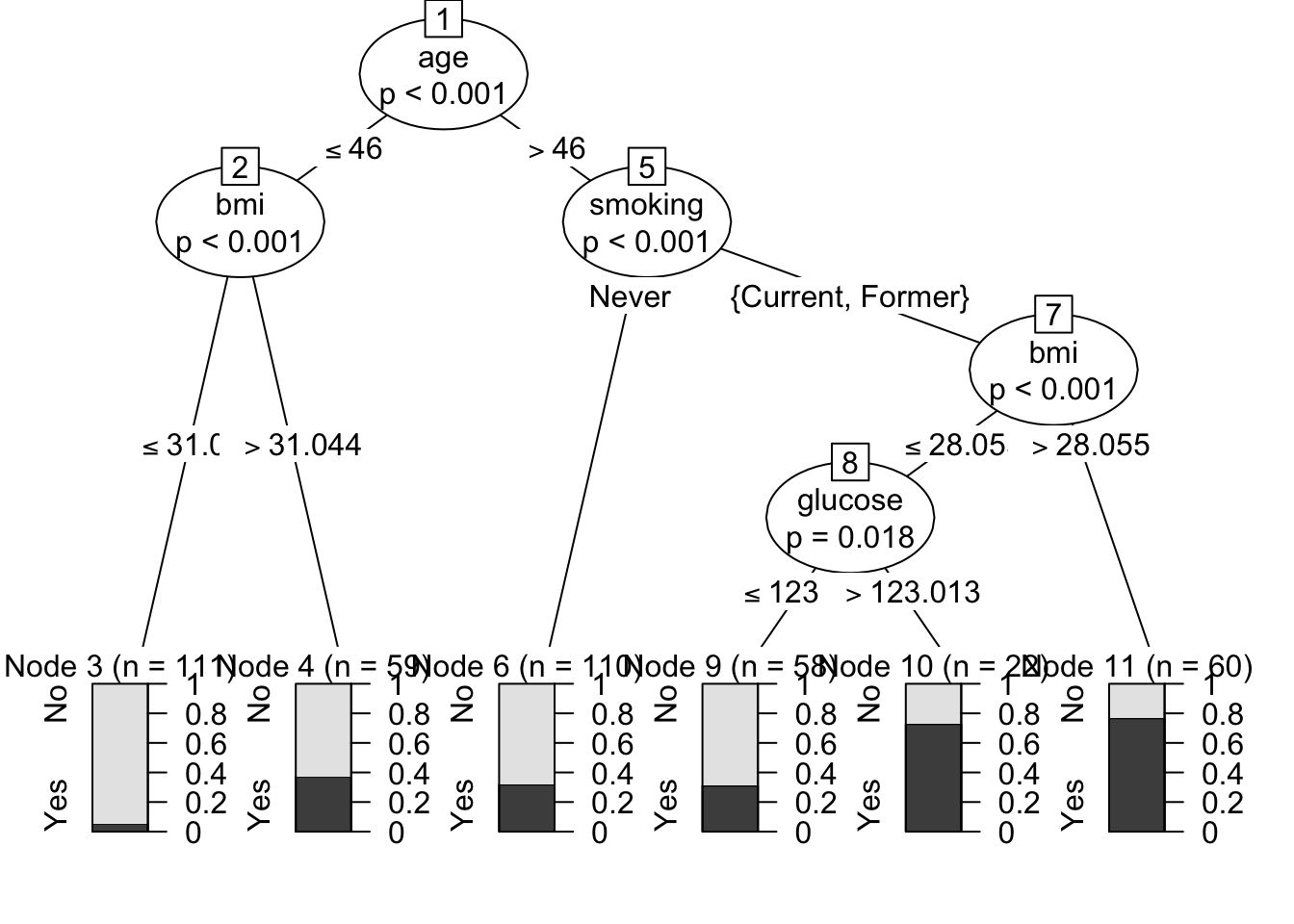
The single tree can still be drawn directly:

Code
plot(disease_tree)
Figure 142.1: Conditional inference tree in the medical example

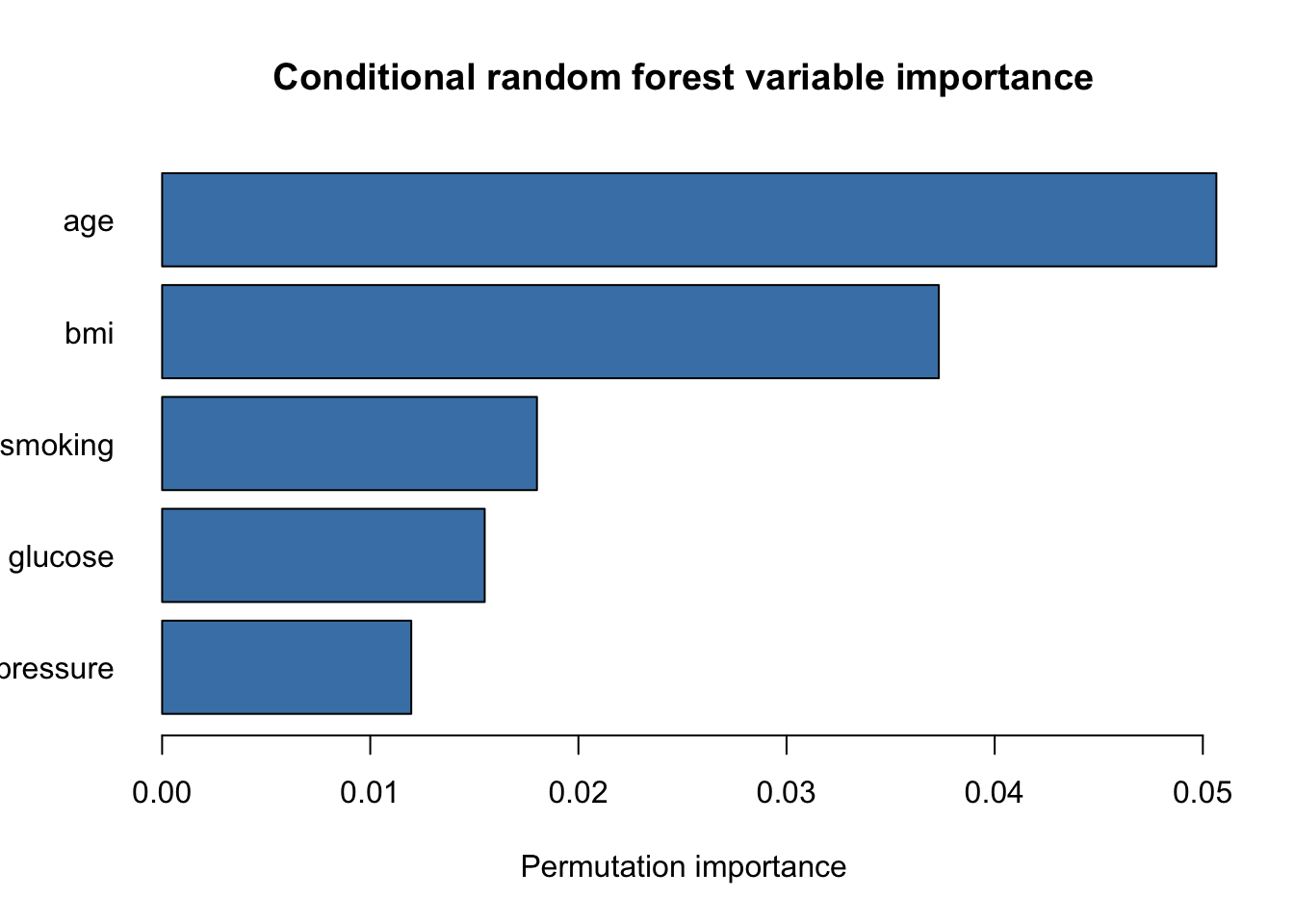
The forest cannot be summarized by one tree diagram. A more appropriate first summary is variable importance:

Code
forest_importance <- sort(varimp(disease_forest), decreasing = TRUE)

barplot(
  rev(forest_importance),
  horiz = TRUE,
  las = 1,
  col = "steelblue",
  main = "Conditional random forest variable importance",
  xlab = "Permutation importance"
)
Figure 142.2: Variable importance from the conditional random forest

This is one of the central interpretive differences:

  • with ctree, you explain the fitted structure through nodes and splits,
  • with cforest, you explain the model through predictive performance and variable importance.

That is why cforest is usually a predictive benchmark, not the first explanatory choice.

142.9 Repeated Holdout: Average Performance and Reliability

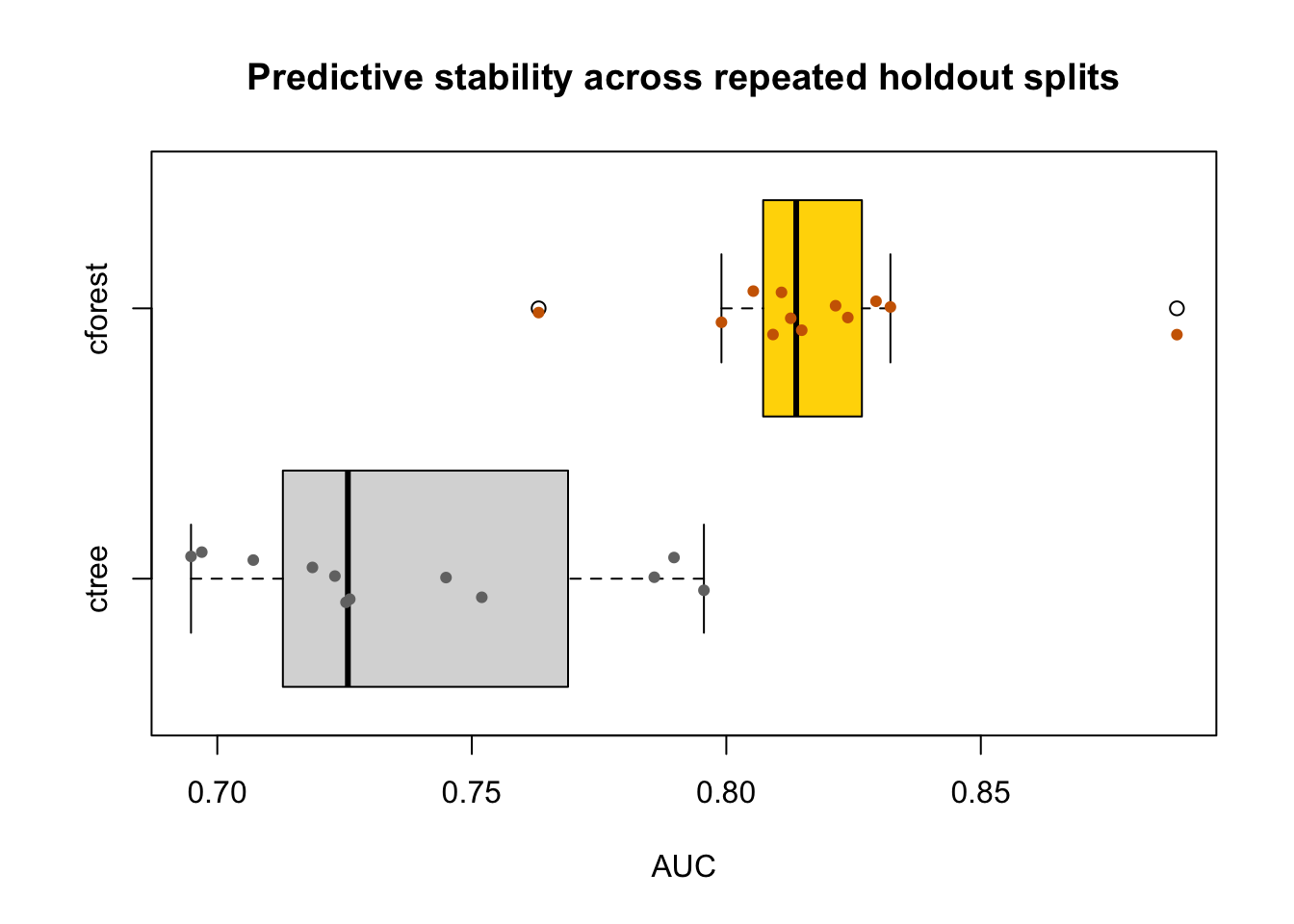
One train/test split is useful, but it does not tell you how stable the comparison is. The next code block therefore repeats the split several times and records the test AUC of both models. This is the same idea introduced formally in Section 160.3.

set.seed(707)
reps <- 12

auc_tree <- numeric(reps)
auc_forest <- numeric(reps)

for (i in seq_len(reps)) {
  idx <- sample(seq_len(nrow(medical_data)), size = floor(0.7 * nrow(medical_data)))
  train_i <- medical_data[idx, ]
  test_i <- medical_data[-idx, ]

  tree_i <- ctree(
    disease ~ age + bmi + blood_pressure + glucose + smoking,
    data = train_i,
    controls = ctree_control(mincriterion = 0.95, minsplit = 20)
  )

  forest_i <- cforest(
    disease ~ age + bmi + blood_pressure + glucose + smoking,
    data = train_i,
    controls = cforest_unbiased(ntree = 120, mtry = 3)
  )

  p_tree_i <- do.call(rbind, predict(tree_i, newdata = test_i, type = "prob"))
  colnames(p_tree_i) <- levels(train_i$disease)
  p_forest_i <- do.call(rbind, predict(forest_i, newdata = test_i, OOB = FALSE, type = "prob"))

  actual_i <- as.integer(test_i$disease == "Yes")
  auc_tree[i] <- auc_manual(actual_i, p_tree_i[, "Yes"])
  auc_forest[i] <- auc_manual(actual_i, p_forest_i[, "disease.Yes"])
}

stability_tab <- data.frame(
  Model = c("Conditional inference tree", "Conditional random forest"),
  MeanAUC = c(mean(auc_tree), mean(auc_forest)),
  MedianAUC = c(median(auc_tree), median(auc_forest)),
  SDAUC = c(sd(auc_tree), sd(auc_forest))
)

knitr::kable(
  transform(
    stability_tab,
    MeanAUC = round(MeanAUC, 3),
    MedianAUC = round(MedianAUC, 3),
    SDAUC = round(SDAUC, 3)
  ),
  caption = "Repeated-holdout AUC summary for ctree and cforest"
)
Repeated-holdout AUC summary for ctree and cforest
Model MeanAUC MedianAUC SDAUC
Conditional inference tree 0.738 0.726 0.036
Conditional random forest 0.818 0.814 0.029
Code
boxplot(
  auc_tree,
  auc_forest,
  horizontal = TRUE,
  names = c("ctree", "cforest"),
  col = c("grey85", "gold"),
  xlab = "AUC",
  main = "Predictive stability across repeated holdout splits"
)
stripchart(
  list(auc_tree, auc_forest),
  method = "jitter",
  vertical = FALSE,
  add = TRUE,
  pch = 19,
  col = c("grey45", "darkorange3"),
  cex = 0.7
)
Figure 142.3: Repeated-holdout AUC distributions for ctree and cforest

This plot should be read exactly the way the guided workflow asks you to read predictive stability:

  • the box position reflects average predictive quality,
  • the line inside the box is the median repeated-holdout result,
  • the spread reflects reliability across splits.

If one model has slightly better average AUC but much wider spread, the final choice becomes a judgment about accuracy versus reliability rather than a purely mechanical ranking.

142.10 How This Connects to the Guided Workflow

The Guided Model Building app does not treat cforest as “just another tree.” It treats it as:

  • a predictive benchmark against simpler models,
  • a model whose importance summaries can be inspected,
  • a model whose repeated-validation stability must be read carefully.

This is why the later chapters on Chapter 163 and Chapter 164 compare forests through validation summaries, stability plots, and revision tables rather than through a single explanatory diagram.

142.11 Pros and Cons

142.11.1 Pros

  • often stronger predictive performance than a single tree,
  • less sensitive to one particular training split,
  • handles nonlinearities and interactions automatically.

142.11.2 Cons

  • much less directly interpretable than ctree,
  • slower to fit and diagnose,
  • variable importance is useful but does not replace a clear model diagram.

142.12 Practical Reading Rule

Use cforest when the goal is mainly prediction and you want a flexible tree-based benchmark. Prefer ctree or logistic regression when the primary goal is explanation and the fitted structure itself must be read directly.

142.13 Task

  1. Recreate the medical example and compare ctree with cforest on a train/test split.
  2. Report both accuracy and AUC. Does the forest improve both?
  3. Inspect the variable-importance plot. Which predictor appears strongest?
  4. Repeat the split several times. Does the model with the higher average AUC also look more stable, or does the comparison involve a tradeoff between performance and reliability?
141  Leaf Diagnostics for Conditional Inference Trees
143  Hypothesis Testing with Linear Regression Models (from a Practical Point of View)

© 2026 Patrick Wessa. Provided as-is, without warranty.

Feedback: e-mail | Anonymous contributions: click to copy (Sats) | click to copy (XMR)

Cookie Preferences