• Descriptive
    • Moments
    • Concentration
    • Central Tendency
    • Variability
    • Stem-and-Leaf Plot
    • Histogram & Frequency Table
    • Data Quality Forensics
    • Conditional EDA
    • Quantiles
    • Kernel Density Estimation
    • Normal QQ Plot
    • Bootstrap Plot

    • Multivariate Descriptive Statistics
  • Distributions
    • Binomial Probabilities
    • Geometric Probabilities
    • Negative Binomial Probabilities
    • Hypergeometric Probabilities
    • Multinomial Probabilities
    • Dirichlet
    • Poisson Probabilities

    • Exponential
    • Gamma
    • Erlang
    • Weibull
    • Rayleigh
    • Maxwell-Boltzmann
    • Lognormal
    • Pareto
    • Inverse Gamma
    • Inverse Chi-Square

    • Beta
    • Power
    • Beta Prime (Inv. Beta)
    • Triangular

    • Normal (area)
    • Logistic
    • Laplace
    • Cauchy (standard)
    • Cauchy (location-scale)
    • Gumbel
    • Fréchet
    • Generalized Extreme Value

    • Normal RNG
    • ML Fitting
    • Tukey Lambda PPCC
    • Box-Cox Normality Plot
    • Noncentral t
    • Noncentral F
    • Sample Correlation r

    • Empirical Tests
  • Hypotheses
    • Theoretical Aspects of Hypothesis Testing
    • Bayesian Inference
    • Minimum Sample Size

    • Empirical Tests
    • Multivariate (pair-wise) Testing
  • Models
    • Manual Model Building
    • Guided Model Building
  • Time Series
    • Time Series Plot
    • Decomposition
    • Exponential Smoothing

    • Blocked Bootstrap Plot
    • Mean Plot
    • (P)ACF
    • VRM
    • Standard Deviation-Mean Plot
    • Spectral Analysis
    • ARIMA

    • Cross Correlation Function
    • Granger Causality
  1. Model Building Strategies
  2. 162  Hyperparameter Optimization Strategies
  • Preface
  • Getting Started
    • 1  Introduction
    • 2  Why Do We Need Innovative Technology?
    • 3  Basic Definitions
    • 4  The Big Picture: Why We Analyze Data
  • Introduction to Probability
    • 5  Definitions of Probability
    • 6  Jeffreys’ axiom system
    • 7  Bayes’ Theorem
    • 8  Sensitivity and Specificity
    • 9  Naive Bayes Classifier
    • 10  Law of Large Numbers

    • 11  Problems
  • Probability Distributions
    • 12  Bernoulli Distribution
    • 13  Binomial Distribution
    • 14  Geometric Distribution
    • 15  Negative Binomial Distribution
    • 16  Hypergeometric Distribution
    • 17  Multinomial Distribution
    • 18  Poisson Distribution

    • 19  Uniform Distribution (Rectangular Distribution)
    • 20  Normal Distribution (Gaussian Distribution)
    • 21  Gaussian Naive Bayes Classifier
    • 22  Chi Distribution
    • 23  Chi-squared Distribution (1 parameter)
    • 24  Chi-squared Distribution (2 parameters)
    • 25  Student t-Distribution
    • 26  Fisher F-Distribution
    • 27  Exponential Distribution
    • 28  Lognormal Distribution
    • 29  Gamma Distribution
    • 30  Beta Distribution
    • 31  Weibull Distribution
    • 32  Pareto Distribution
    • 33  Inverse Gamma Distribution
    • 34  Rayleigh Distribution
    • 35  Erlang Distribution
    • 36  Logistic Distribution
    • 37  Laplace Distribution
    • 38  Gumbel Distribution
    • 39  Cauchy Distribution
    • 40  Triangular Distribution
    • 41  Power Distribution
    • 42  Beta Prime Distribution
    • 43  Sample Correlation Distribution
    • 44  Dirichlet Distribution
    • 45  Generalized Extreme Value (GEV) Distribution
    • 46  Frechet Distribution
    • 47  Noncentral t Distribution
    • 48  Noncentral F Distribution
    • 49  Inverse Chi-Squared Distribution
    • 50  Maxwell-Boltzmann Distribution
    • 51  Distribution Relationship Map

    • 52  Problems
  • Descriptive Statistics & Exploratory Data Analysis
    • 53  Types of Data
    • 54  Datasheets

    • 55  Frequency Plot (Bar Plot)
    • 56  Frequency Table
    • 57  Contingency Table
    • 58  Binomial Classification Metrics
    • 59  Confusion Matrix
    • 60  ROC Analysis

    • 61  Stem-and-Leaf Plot
    • 62  Histogram
    • 63  Data Quality Forensics
    • 64  Quantiles
    • 65  Central Tendency
    • 66  Variability
    • 67  Skewness & Kurtosis
    • 68  Concentration
    • 69  Notched Boxplot
    • 70  Scatterplot
    • 71  Pearson Correlation
    • 72  Rank Correlation
    • 73  Partial Pearson Correlation
    • 74  Simple Linear Regression
    • 75  Moments
    • 76  Quantile-Quantile Plot (QQ Plot)
    • 77  Normal Probability Plot
    • 78  Probability Plot Correlation Coefficient Plot (PPCC Plot)
    • 79  Box-Cox Normality Plot
    • 80  Kernel Density Estimation
    • 81  Bivariate Kernel Density Plot
    • 82  Conditional EDA: Panel Diagnostics
    • 83  Bootstrap Plot (Central Tendency)
    • 84  Survey Scores Rank Order Comparison
    • 85  Cronbach Alpha

    • 86  Equi-distant Time Series
    • 87  Time Series Plot (Run Sequence Plot)
    • 88  Mean Plot
    • 89  Blocked Bootstrap Plot (Central Tendency)
    • 90  Standard Deviation-Mean Plot
    • 91  Variance Reduction Matrix
    • 92  (Partial) Autocorrelation Function
    • 93  Periodogram & Cumulative Periodogram

    • 94  Problems
  • Hypothesis Testing
    • 95  Normal Distributions revisited
    • 96  The Population
    • 97  The Sample
    • 98  The One-Sided Hypothesis Test
    • 99  The Two-Sided Hypothesis Test
    • 100  When to use a one-sided or two-sided test?
    • 101  What if \(\sigma\) is unknown?
    • 102  The Central Limit Theorem (revisited)
    • 103  Statistical Test of the Population Mean with known Variance
    • 104  Statistical Test of the Population Mean with unknown Variance
    • 105  Statistical Test of the Variance
    • 106  Statistical Test of the Population Proportion
    • 107  Statistical Test of the Standard Deviation \(\sigma\)
    • 108  Statistical Test of the difference between Means -- Independent/Unpaired Samples
    • 109  Statistical Test of the difference between Means -- Dependent/Paired Samples
    • 110  Statistical Test of the difference between Variances -- Independent/Unpaired Samples

    • 111  Hypothesis Testing for Research Purposes
    • 112  Decision Thresholds, Alpha, and Confidence Levels
    • 113  Bayesian Inference for Decision-Making
    • 114  One Sample t-Test
    • 115  Skewness & Kurtosis Tests
    • 116  Paired Two Sample t-Test
    • 117  Wilcoxon Signed-Rank Test
    • 118  Unpaired Two Sample t-Test
    • 119  Unpaired Two Sample Welch Test
    • 120  Two One-Sided Tests (TOST) for Equivalence
    • 121  Mann-Whitney U test (Wilcoxon Rank-Sum Test)
    • 122  Bayesian Two Sample Test
    • 123  Median Test based on Notched Boxplots
    • 124  Chi-Squared Tests for Count Data
    • 125  Kolmogorov-Smirnov Test
    • 126  One Way Analysis of Variance (1-way ANOVA)
    • 127  Kruskal-Wallis Test
    • 128  Two Way Analysis of Variance (2-way ANOVA)
    • 129  Repeated Measures ANOVA
    • 130  Friedman Test
    • 131  Testing Correlations
    • 132  A Note on Causality

    • 133  Problems
  • Regression Models
    • 134  Simple Linear Regression Model (SLRM)
    • 135  Multiple Linear Regression Model (MLRM)
    • 136  Logistic Regression
    • 137  Generalized Linear Models
    • 138  Multinomial and Ordinal Logistic Regression
    • 139  Cox Proportional Hazards Regression
    • 140  Conditional Inference Trees
    • 141  Leaf Diagnostics for Conditional Inference Trees
    • 142  Conditional Random Forests
    • 143  Hypothesis Testing with Linear Regression Models (from a Practical Point of View)

    • 144  Problems
  • Introduction to Time Series Analysis
    • 145  Case: the Market of Health and Personal Care Products
    • 146  Decomposition of Time Series
    • 147  Ad hoc Forecasting of Time Series
  • Box-Jenkins Analysis
    • 148  Introduction to Box-Jenkins Analysis
    • 149  Theoretical Concepts
    • 150  Stationarity
    • 151  Identifying ARMA parameters
    • 152  Estimating ARMA Parameters and Residual Diagnostics
    • 153  Forecasting with ARIMA models
    • 154  Intervention Analysis
    • 155  Cross-Correlation Function
    • 156  Transfer Function Noise Models
    • 157  General-to-Specific Modeling
  • Model Building Strategies
    • 158  Introduction to Model Building Strategies
    • 159  Manual Model Building
    • 160  Model Validation
    • 161  Regularization Methods
    • 162  Hyperparameter Optimization Strategies
    • 163  Guided Model Building in Practice
    • 164  Diagnostics, Revision, and Guided Forecasting
    • 165  Leakage, Target Encoding, and Robust Regression
  • References
  • Appendices
    • Appendices
    • A  Method Selection Guide
    • B  Presentations and Teaching Materials
    • C  R Language Concepts for Statistical Computing
    • D  Matrix Algebra
    • E  Standard Normal Table (Gaussian Table)
    • F  Critical values of Student’s \(t\) distribution with \(\nu\) degrees of freedom
    • G  Upper-tail critical values of the \(\chi^2\)-distribution with \(\nu\) degrees of freedom
    • H  Lower-tail critical values of the \(\chi^2\)-distribution with \(\nu\) degrees of freedom

Table of contents

  • 162.1 Why Hyperparameter Tuning Is a Modeling Stage
  • 162.2 Common Search Strategies
  • 162.3 A Tuning Workflow That Stays Honest
  • 162.4 Worked Example: Tuning cforest on Pima.tr
    • 162.4.1 Visualizing Accuracy and Reliability Together
  • 162.5 How to Read Near Ties
  • 162.6 Beyond Grid Search
  • 162.7 Try Hyperparameter Tuning in the Apps
    • 162.7.1 Manual Model Building: Explicit cforest Controls
    • 162.7.2 Guided Model Building: Automated Shrinkage Tuning
  • 162.8 Practical Reading Rule
  • 162.9 Practical Exercises
  1. Model Building Strategies
  2. 162  Hyperparameter Optimization Strategies

162  Hyperparameter Optimization Strategies

Many model settings are not estimated automatically from the data. They must be fixed before fitting begins. Those settings are hyperparameters.

Examples from this handbook include:

Method Hyperparameter examples
Ridge / lasso / elastic net lambda, alpha
Conditional random forest ntree, mtry, mincriterion
Naive Bayes Laplace correction, kernel choice
k-nearest neighbors k
Smoothing methods bandwidth or window width

The central rule is simple: hyperparameters should be chosen by validation, not by convenience.

162.1 Why Hyperparameter Tuning Is a Modeling Stage

Hyperparameter optimization is not an optional technical afterthought. It is one of the main modeling decisions.

If you make the model too flexible, it overfits. If you make it too rigid, it underfits. Tuning is the search for a defensible middle ground.

That is why the tuning stage belongs inside the larger workflow described in Section 158.1:

  1. define the goal,
  2. split the data honestly,
  3. search over candidate settings,
  4. compare held-out performance,
  5. choose a setting,
  6. only then report final performance on untouched data if such a split has been reserved.

162.2 Common Search Strategies

Strategy Idea Strength Weakness
Manual tuning try a few values by judgment fast for teaching and small problems can miss good regions entirely
Grid search define a small grid and evaluate every combination transparent and reproducible becomes expensive as dimensions grow
Random search sample settings at random from a sensible range more efficient when many hyperparameters exist less exhaustive, can feel less intuitive
Adaptive search use previous results to guide the next trial efficient for expensive models harder to explain and audit

For this handbook, grid search is the best teaching device because students can see every candidate value and every comparison. In larger real-world problems, random or adaptive search often becomes more practical.

162.3 A Tuning Workflow That Stays Honest

The search itself can cause optimism if the same data are reused carelessly. The safe pattern is:

  • use the training data to fit the candidate settings,
  • use validation or repeated holdout to compare those settings,
  • keep a separate outer test or locked final test for one last report if the workflow is confirmatory.

This is the same discipline used in Chapter 161. The object being tuned changes; the logic does not.

162.4 Worked Example: Tuning cforest on Pima.tr

The current manual app now lets you fit cforest directly, but it does not expose a full search grid. The point of this chapter is therefore to show the search explicitly in R.

We tune two forest hyperparameters:

  • ntree: how many trees are averaged,
  • mtry: how many predictors are considered at each split.

To keep the example readable, the grid is deliberately small and each setting is evaluated across five repeated holdout splits.

library(MASS)
library(party)

data("Pima.tr", package = "MASS")

auc_manual <- function(actual, score) {
  r <- rank(score)
  n1 <- sum(actual == 1)
  n0 <- sum(actual == 0)
  (sum(r[actual == 1]) - n1 * (n1 + 1) / 2) / (n1 * n0)
}

yes_col <- function(mat) {
  nm <- colnames(mat)
  if ("Yes" %in% nm) return("Yes")
  hit <- grep("Yes$", nm, value = TRUE)
  if (length(hit) > 0) return(hit[1])
  stop("No positive-class column found.")
}

set.seed(123)
forest_grid <- expand.grid(
  ntree = c(50, 100, 200),
  mtry = c(2, 3, 4)
)

forest_grid$mean_auc <- NA_real_
forest_grid$sd_auc <- NA_real_

for (g in seq_len(nrow(forest_grid))) {
  aucs <- numeric(5)

  for (r in 1:5) {
    idx <- sample(seq_len(nrow(Pima.tr)), size = floor(0.8 * nrow(Pima.tr)))
    train_r <- Pima.tr[idx, ]
    test_r <- Pima.tr[-idx, ]

    fit_r <- cforest(
      type ~ .,
      data = train_r,
      controls = cforest_unbiased(
        ntree = forest_grid$ntree[g],
        mtry = forest_grid$mtry[g]
      )
    )

    prob_r <- do.call(
      rbind,
      predict(fit_r, newdata = test_r, OOB = FALSE, type = "prob")
    )

    aucs[r] <- auc_manual(
      as.integer(test_r$type == "Yes"),
      prob_r[, yes_col(prob_r)]
    )
  }

  forest_grid$mean_auc[g] <- mean(aucs)
  forest_grid$sd_auc[g] <- sd(aucs)
}

forest_grid <- forest_grid[order(-forest_grid$mean_auc, forest_grid$sd_auc), ]

knitr::kable(
  transform(
    forest_grid,
    mean_auc = round(mean_auc, 3),
    sd_auc = round(sd_auc, 3)
  ),
  caption = "Repeated-holdout AUC for a small cforest hyperparameter grid"
)
Repeated-holdout AUC for a small cforest hyperparameter grid
ntree mtry mean_auc sd_auc
6 200 3 0.881 0.048
8 100 4 0.855 0.041
1 50 2 0.822 0.061
2 100 2 0.820 0.051
3 200 2 0.819 0.025
5 100 3 0.817 0.057
4 50 3 0.805 0.063
7 50 4 0.792 0.034
9 200 4 0.792 0.047

162.4.1 Visualizing Accuracy and Reliability Together

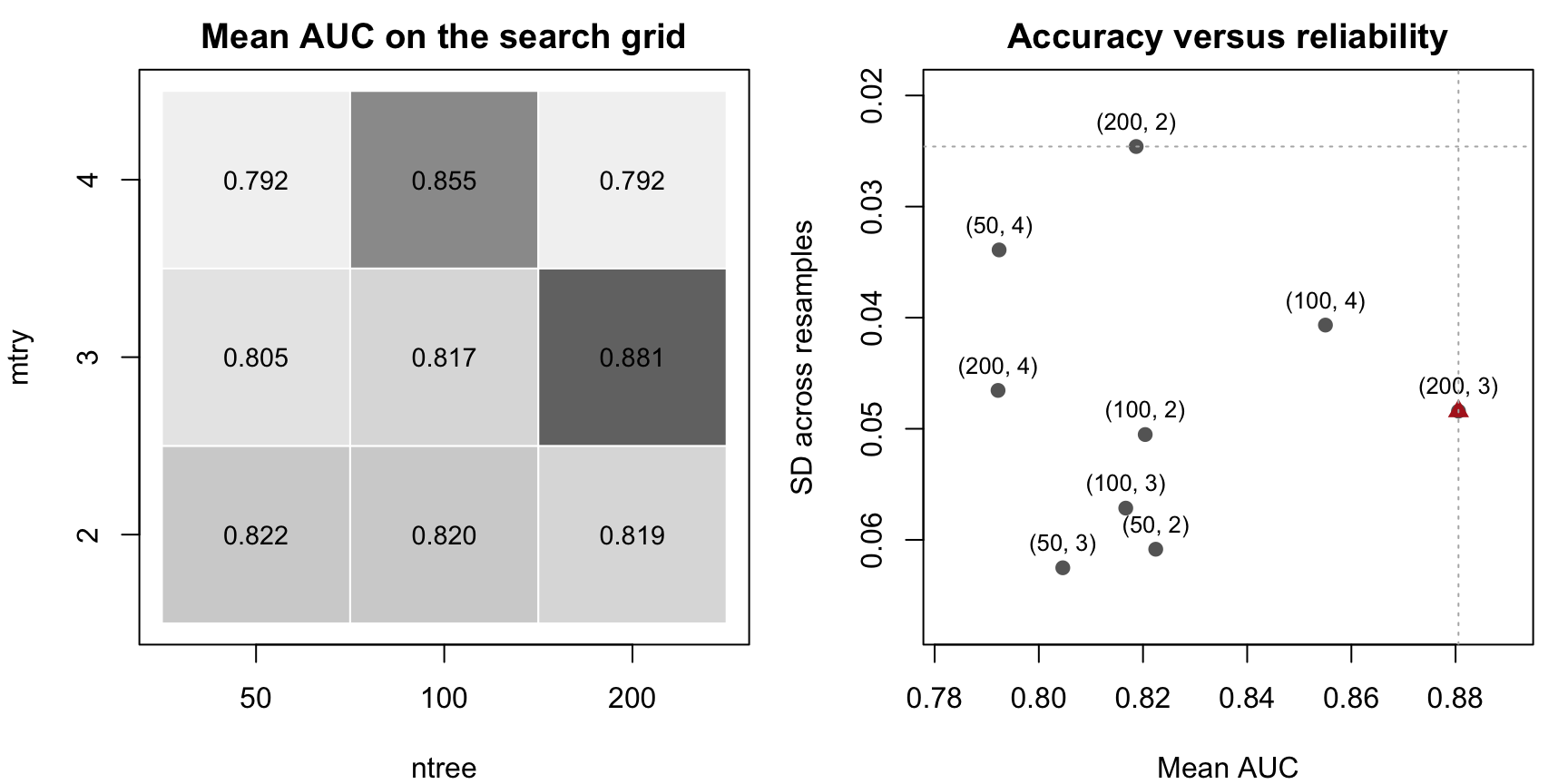
The next figure uses the same tuning results in two ways:

  • the left panel shows mean AUC on the grid,
  • the right panel shows the tradeoff between average AUC and variability across resamples.
ntree_vals <- sort(unique(forest_grid$ntree))
mtry_vals <- sort(unique(forest_grid$mtry))

mean_mat <- matrix(
  NA_real_,
  nrow = length(mtry_vals),
  ncol = length(ntree_vals),
  dimnames = list(mtry_vals, ntree_vals)
)

for (i in seq_len(nrow(forest_grid))) {
  row_idx <- match(forest_grid$mtry[i], mtry_vals)
  col_idx <- match(forest_grid$ntree[i], ntree_vals)
  mean_mat[row_idx, col_idx] <- forest_grid$mean_auc[i]
}

zvals <- as.vector(mean_mat)
zbreaks <- seq(min(zvals) - 1e-6, max(zvals) + 1e-6, length.out = 11)
zcols <- gray.colors(length(zbreaks) - 1, start = 0.95, end = 0.45)

par(mfrow = c(1, 2), mar = c(4, 4, 2, 1))

plot.new()
plot.window(xlim = c(0.5, length(ntree_vals) + 0.5),
            ylim = c(0.5, length(mtry_vals) + 0.5))

for (i in seq_along(ntree_vals)) {
  for (j in seq_along(mtry_vals)) {
    val <- mean_mat[j, i]
    col_idx <- findInterval(val, zbreaks, all.inside = TRUE)
    rect(i - 0.5, j - 0.5, i + 0.5, j + 0.5,
         col = zcols[col_idx], border = "white")
    text(i, j, labels = sprintf("%.3f", val), cex = 0.9)
  }
}

axis(1, at = seq_along(ntree_vals), labels = ntree_vals)
axis(2, at = seq_along(mtry_vals), labels = mtry_vals)
box()
title(main = "Mean AUC on the search grid",
      xlab = "ntree",
      ylab = "mtry")

best_idx <- which.max(forest_grid$mean_auc)

plot(forest_grid$mean_auc, forest_grid$sd_auc,
     xlab = "Mean AUC",
     ylab = "SD across resamples",
     main = "Accuracy versus reliability",
     pch = 19, col = "grey40",
     xlim = c(min(forest_grid$mean_auc) - 0.01, max(forest_grid$mean_auc) + 0.01),
     ylim = c(max(forest_grid$sd_auc) + 0.005, min(forest_grid$sd_auc) - 0.005))

text(forest_grid$mean_auc, forest_grid$sd_auc,
     labels = paste0("(", forest_grid$ntree, ", ", forest_grid$mtry, ")"),
     pos = 3, cex = 0.8)

points(forest_grid$mean_auc[best_idx], forest_grid$sd_auc[best_idx],
       pch = 17, col = "firebrick", cex = 1.2)
abline(v = max(forest_grid$mean_auc), lty = 3, col = "grey70")
abline(h = min(forest_grid$sd_auc), lty = 3, col = "grey70")

Hyperparameter tuning for cforest on Pima.tr. Left: mean AUC on a small ntree × mtry grid. Right: average AUC versus variability across resamples.

The right-hand panel is especially important. The point with the highest mean AUC is not always the point with the lowest variability.

That gives two different questions:

  1. Which setting is best on average?
  2. Which setting is most reliable across resamples?

If one setting is clearly better on both, the decision is easy. If one setting is slightly better on average but much more variable, the decision becomes a judgment call rather than a mechanical rule.

162.5 How to Read Near Ties

Hyperparameter search almost never ends with one magical number. More often, several settings are practically close.

When settings are close, use a rule like this:

  • prefer the higher average performance,
  • but do not ignore variability,
  • and if the gap in mean performance is tiny, prefer the simpler or cheaper setting.

For a forest, “simpler or cheaper” can mean:

  • fewer trees,
  • smaller mtry,
  • or a setting whose performance is almost as good but clearly more stable.

This is the same reasoning used in the predictive-stability plots of the Guided Model Building app. The vocabulary changes from chapter to chapter, but the workflow principle stays the same: average accuracy and reliability are both part of model quality.

162.6 Beyond Grid Search

The toy grid above is useful because it is small enough to inspect completely. In larger problems, full grids become inefficient.

That is where random search becomes attractive. If a model has several hyperparameters, a coarse grid can waste many fits on unimportant directions, while random search can explore more of the space with the same computational budget.

So the practical progression is:

  • use grid search when the teaching goal is transparency,
  • use random or adaptive search when the real-world problem becomes too large for exhaustive grids.

162.7 Try Hyperparameter Tuning in the Apps

The apps now expose two different tuning styles:

  • the app in the menu Models / Manual Model Building gives you direct control over specific hyperparameters such as ntree, mtry, and the regularization mode,
  • the Guided Model Building app automates compact training-only searches for regularized coefficient models and then reports the selected tuning summary inside the workflow.

162.7.1 Manual Model Building: Explicit cforest Controls

In the manual app, the Tree tab now lets you switch between ctree and cforest, choose a capped number of trees, set mtry, and fit the forest asynchronously. If another heavy forest fit is already running, the app places the request in a simple queue and tells the learner to wait instead of hammering the fit button repeatedly.

Interactive Shiny app (click to load).
Open in new tab

That is not a full grid search, but it is a genuine hyperparameter exercise: you can change the forest size, change mtry, refit, and compare how the confusion matrix, threshold-sensitive metrics, ROC behavior, and forest importance output respond.

162.7.2 Guided Model Building: Automated Shrinkage Tuning

The guided app does not expose a large open search grid. Instead, it automates a compact search over ridge, elastic-net, and lasso style penalties for its regularized coefficient candidates and reports the resulting summary in the fitted model details.

WarningFull-screen use

The Guided Model Building app still works best in a new tab, but the embedded session below opens directly on a regularized Cars93 workflow so you can inspect the tuned search table and the predictive-stability plots.

Interactive Guided Model Building session (click to load).
Open in new tab

The key point is methodological:

  • the manual app lets you turn the knobs yourself,
  • the guided app keeps the search smaller and more structured, but still shows which hyperparameter choice won and how stable that choice looks across validation splits.

What the apps still do not do is let the learner launch a very large free-form search across many model families at once. This chapter therefore remains useful because it shows the larger logic of search grids, repeated evaluation, and the tradeoff between average performance and reliability.

162.8 Practical Reading Rule

Treat hyperparameter optimization as part of the model, not as a cosmetic setting panel.

  • Never tune on the final test data.
  • Prefer validation summaries over training scores.
  • Read both average performance and variability.
  • When two settings are practically tied, prefer the simpler or cheaper one.

162.9 Practical Exercises

  1. Extend the cforest grid by adding ntree = 300. Does the best mean AUC improve enough to justify the extra computation?
  2. Change the evaluation metric from AUC to accuracy at threshold 0.50. Does the ranking of the grid change?
  3. Repeat the same tuning exercise with only mtry = 2 and many different ntree values. At what point does adding more trees stop helping much?
  4. Write one paragraph explaining why a final untouched test set is still useful even after a large validation-based search.
161  Regularization Methods
163  Guided Model Building in Practice

© 2026 Patrick Wessa. Provided as-is, without warranty.

Feedback: e-mail | Anonymous contributions: click to copy (Sats) | click to copy (XMR)

Cookie Preferences